
It’s not an easy answer — which version is best for you? The Always Free Autonomous Database in the Oracle Cloud (currently on version 23.6.0.24.11) or the free developer edition for Windows or Linux (currently on version 23.6.0.24.10)?
The answer depends on a number of factors:
- CPU availability
- Database size
- Cost (both are more or less free, but…)
- Ease of setup
- Performance of initial setup
- Running a vector distance search
I’ll show a basic example of how to set up vector processing and searching with some of 23ai’s new features on both platforms and see how they compare.
Model and AI Components
In this demo of the Oracle OCI Autonomous Database version and the 23ai Free Developer Edition I’ll use the Hugging Face all-MiniLM-L12-v2 model in ONNX format. It’s available for download to use with a local installation of 23ai and is also available from an Oracle OCI object storage location as you’ll see below. First, the test will load the model into the database with DBMS_VECTOR. Next, I’ll create a new table with a VECTOR datatype and load several thousand rows into the table with text from the list of ORA- error messages and generate a vector for each row using the model. Finally, I’ll run a few searches across the error messages for semantic similarity and see how fast they run in each environment.
Free 23ai Developer Edition on Linux 8 Using VirtualBox
You can get a pre-built VirtualBox image or you can create a Linux 8 VM yourself and install the 23ai Developer Edition from Oracle. In either case, you will have to download the all-MiniLM-L12-v2 model and make it accessible from your VM or PC with a local installation of 23ai.
Step 1 is to create a directory object that points to the ONNX model file. We’ll reference it in the load step later.
create directory if not exists
   onnx_model as '/media/sf_Temp/all_MiniLM_L12_v2_augmented';
Note another example of the new (and very welcomed) 23ai DDL clause “if not exists“. The next step is to run an anonymous PL/SQL block that loads the model into the database.
declare
    onnx_model_file varchar2(100) := 'all_MiniLM_L12_v2.onnx';
    modname varchar2(500) := 'ALL_MINILM_L12_V2';
begin
   -- drop and recreate the model if it already exists
   begin
      dbms_data_mining.drop_model(model_name => modname);
      exception when others then null;
   end;
   -- load the model into the Oracle Database internal format
   dbms_vector.load_onnx_model(
      directory => 'ONNX_MODEL',
      file_name => onnx_model_file,
      model_name => modname,
      metadata => JSON('{"function" : "embedding", "embeddingOutput" : "embedding", "input": {"input": ["DATA"]}}')
      )
    ;
end;
/
The METADATA parameter of DBMS_VECTOR.LOAD_ONNX_MODEL is optional for some models but I’m specifying it for completeness. The runtime was 23.2 seconds with a cold buffer cache. Since this is the 23ai free edition, CPU_COUNT=2. All the runtime statistics and a comparison between environments is later in this post.
Confirming that the model has been successfully loaded:
select model_name, model_size, algorithm, mining_function
from user_mining_models
where model_name='ALL_MINILM_L12_V2';

MODEL_NAME                MODEL_SIZE ALGORITHM       MINING_FUNCTION
------------------------- ---------- --------------- ---------------------
ALL_MINILM_L12_V2          133322334 ONNX            EMBEDDING
To test the model using semantic searches using text strings, I’ll need some sample data. This step creates a new table and loads 27,487 of the existing ORA- error numbers and error messages into a table that also contains a column (line 7) with a VECTOR datatype that numerically represents the attributes of the error message itself. Now that the model has been loaded, I use the VECTOR_EMBEDDING function in line 25 to populate the VECTOR column.
-- create a table with ORA- error messages that range from 1 to 65535
drop table if exists my_ora_errors;
create table my_ora_errors (
   id        number generated always as identity,
   err_code  varchar2(25),
   err_text  varchar2(200),
   err_v     vector
);

declare
   v_err_msg   varchar2(2000);
   v_err_msg_code  varchar2(25);
   v_err_msg_text  varchar2(200);
begin
for i in 1..65535
    loop
       v_err_msg := sqlerrm(-i);
       -- 00001 to 65535, but not
       -- Message 435 not found;  product=RDBMS; facility=ORA
       if not regexp_like(v_err_msg, 'Message [[:digit:]]+ not found') then
          v_err_msg_code := substr(v_err_msg,1,instr(v_err_msg,':')-1);
          v_err_msg_text := substr(v_err_msg,instr(v_err_msg,':')+2);
          insert into my_ora_errors (err_code,err_text,err_v)
          values(v_err_msg_code,v_err_msg_text,
           vector_embedding(ALL_MINILM_L12_V2 using v_err_msg_text as data)
          );
       end if;
    end loop;
    commit;
end;
/
The 27,487 rows in the table look like this. The default VECTOR datatype is an array of floating point numbers.

To search that list of 27,487 rows as a semantic search, I will take the search string, convert the string to a vector using the same model, then calculate the distance between the search string’s vector and the vector for each of the rows in the table. I’ll return the top 10 rows that are closest to the search string. In a production application, the search string would be entered on a web page form or something similar. For the purposes of testing out vectors, I’ll use a substitution variable in a query.
select /*+ montor */ id, err_code, err_text,
   vector_distance(err_v,
      vector_embedding(ALL_MINILM_L12_V2 using '&srchstr' as data)) v_dist
from my_ora_errors
order by 4
fetch first 10 rows only;
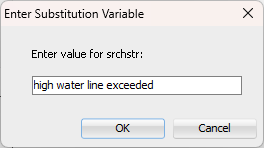
There is no exact error message with that phrase, much less most of those words. But the search is semantic: I’ll get the top 10 matches that are closest to my search string. The lower the V_DIST the closer the match. By default, the distance calculation (VECTOR_DISTANCE) uses the COSINE method.

I’ll try one more with the search string of “SQL Server tempdb resizing”:
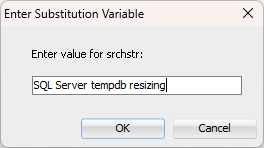

I’m clearly looking for an error message about a different database platform, and as a result the closest distance is much farther away than the previous search string. In both cases, the query runs in 0.58 seconds.
Always Free Autonomous Database in Oracle Cloud
The free Autonomous Database in OCI runs on a tiny slice of a shared Exadata environment. Loading the model uses the same PL/SQL code, with the difference being where the model is located. The OCI version of the model loading code needs to use a saved credential and an ONNX model location in object storage via the directory object DATA_PUMP_DIR.
-- create credentials
begin
    dbms_cloud.create_credential(
    credential_name => 'RJB_STREET_CRED',
    username => 'RJB',
    password => 'xxxxxxxxxxxxxx');
end;
/

declare
    onnx_model_file varchar2(100) := 'all_MiniLM_L12_v2.onnx';
    modname varchar2(500) := 'ALL_MINILM_L12_V2';
    modloc VARCHAR2(200) := 'https://objectstorage.<region>.oraclecloud.com/n/<namespace>/b/<bucketname>/o/';
begin
   --drop if it's already there
   begin
      dbms_data_mining.drop_model(model_name => modname);
      exception when others then null;
   end;
   -- get the file and put it in DATA_PUMP_DIR
   dbms_cloud.get_object(
      credential_name => 'RJB_STREET_CRED',
      directory_name => 'DATA_PUMP_DIR',
      object_uri => modloc||onnx_model_file);
   -- load it
   dbms_vector.load_onnx_model(
      directory => 'DATA_PUMP_DIR',
      file_name => onnx_model_file,
      model_name => modname,
      metadata => JSON('{"function" : "embedding", "embeddingOutput" : "embedding", "input": {"input": ["DATA"]}}'))
    ;
end;
/
Alternatively, you can load the model directly from object storage with DBMS_VECTOR.LOAD_ONNX_MODEL_CLOUD. Load time for the model from object storage was 16.0 seconds.
The results for the query with the search string of “SQL Server tempdb resizing” returns identical results from a text perspective to the on-premises search, but the vector distances are not exactly the same. This is possibly due to the count of ORA- messages is not identical between the developer edition on Linux and the Autonomous version in OCI or slightly different versions of the ONNX model.
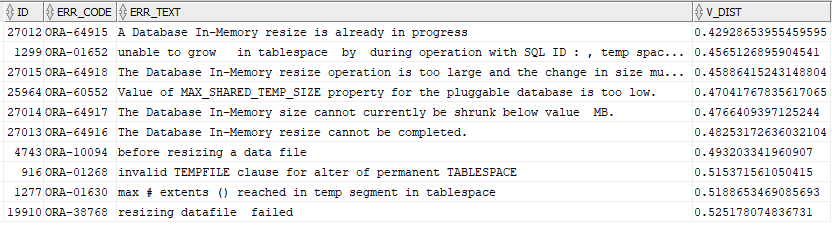
The query runs in 0.77 seconds, comparable to the runtime in the Developer Edition.
Performance Summary
The results are comparable given the size of the database and the size of the table with vectors.

Because the Linux 8 VM environment is unshared and the Autonomous Free environment is shared, no absolute performance comparisons are feasible. But both environments are usable for a testing and development environment.
Which Environment is “Best”?
As with anything related to Oracle Database, it depends. You can have as many VMs as you want, each one running Linux 8 with 23ai, but then you have to manage the local storage and CPU for your environment. The OCI Autonomous “always free” environment can be accessed from a web browser anywhere and permits two instances of a database per region, but you have to have an Oracle Cloud Infrastructure account, which can lead to marketing and sales efforts or undesirable information sharing. Also, if you don’t use the free Autonomous Database for 90 days, the resources may be reclaimed by Oracle, so be sure to at least log in on a regular basis!
Next Steps
Other vector distance algorithms other than COSINE may be more appropriate for searching Oracle error messages, such as DOT, EUCLIDEAN, MANHATTAN, HAMMING, or JACCARD.
Also, since tables in OCI Autonomous databases are compressed by default with HCC QUERY HIGH, it would be more of an equal comparison if the tables were compressed with Advanced Compression, as they are on Linux 8. The higher compression level might account for the slightly longer runtime in OCI for the same query. But that also means you’re going to use up your 20 GB of storage faster.
Finally, since Autonomous databases run on Exadata, performance can also be enhanced with Exadata’s offloading functionality to filter vector results with smart scans at the storage level.


One comment